The Redemption Report shows you how employees are spending their earned Vantage Fit points on rewards. You can see who redeemed what, when they redeemed it, the denomination, and the category — all filterable and exportable as CSV.
Accessing the Redemption Report
- Log in to the Vantage Fit Admin Dashboard.
- Go to Reports in the left sidebar.
- Click Redemption Report.
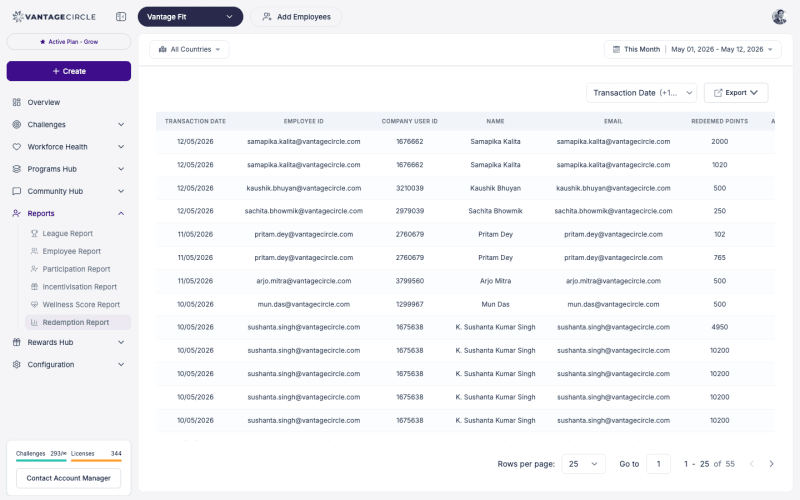
What You See
The Redemption Report displays a table of all reward redemptions made by employees in your company:
| Column | Description |
|---|---|
| Employee name | Who redeemed the reward |
| Employee’s registered email | |
| Reward | What was redeemed (e.g., Amazon Gift Card) |
| Denomination | The value of the reward (e.g., $25, INR 500) |
| Category | Reward category (e.g., Gift Cards, Merchandise) |
| Date | When the redemption occurred |
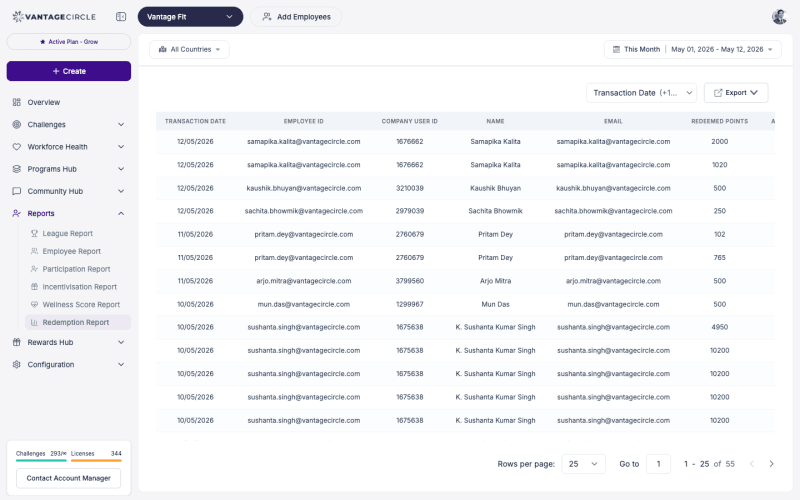
Filtering the Report
Filter by Date Range
- Use the date picker at the top of the report.
- Select a start date and end date.
- The report updates to show only redemptions within that period.
This is useful for monthly or quarterly reporting — set the date range to the period you are analyzing.
Filter by Category
If you want to see redemptions for a specific reward type:
- Use the category filter.
- Select the category (e.g., Gift Cards, Experience Vouchers).
- The report narrows to show only redemptions in that category.
Exporting as CSV
- Apply any filters you want (date range, category).
- Click Export CSV.
- The file downloads to your browser’s default download location.
The exported CSV includes all columns visible in the report, respecting your current filters.
Tip: Export the Redemption Report monthly and archive it. This creates a permanent record for budget reconciliation and audit purposes.
What to Look For
Popular Rewards
Which rewards are employees choosing most often? If 80% of redemptions are Amazon Gift Cards, your employees are telling you what they value. Consider expanding options in popular categories.
Redemption Volume Over Time
Is redemption volume growing month over month? Growing redemptions indicate healthy engagement — employees are earning points (through challenges and activities) and spending them. Flat or declining redemptions may signal low engagement or unappealing reward options.
High-Value Redemptions
Look for patterns in denomination choices. If employees consistently choose the highest available denomination, they may be saving up points for bigger rewards — which means they are engaged over longer periods.
Unused Points
The Redemption Report shows spending, but cross-reference it with the Transaction Report (points earned) to understand the gap between earning and spending. A large gap may mean employees do not know how to redeem, do not find the rewards appealing, or are saving for something specific.
Best Practices
- Review monthly. A monthly check on redemption patterns helps you stay ahead of reward catalog issues.
- Cross-reference with Transaction Report. Compare total points earned versus total points redeemed to understand the earning-to-spending ratio.
- Share insights with your account manager. If certain reward categories are unpopular, your account manager can help adjust the catalog.
- Use for budget planning. Redemption volume directly affects your rewards budget. Use historical redemption data to forecast future spending.
- Check after challenge endings. Redemptions often spike after a major challenge ends, as employees spend newly earned points. Plan for this in your reward inventory.
Need more help? Contact your Vantage Fit account manager or email support@vantagecircle.com.
Related articles: