
Run one focused activity
Use Race, Journey, Streak, or E-Marathon when the program centers on one clear way to make progress.
Start with one of 15 templates or create a challenge in one of five formats. Then set the audience and schedule.
Use Race, Journey, Streak, or E-Marathon when the program centers on one clear way to make progress.
Use Custom when you need several tasks, weekly themes, or a mix of tracked and employee-completed activities.
Choose the activities and format that fit what you want the challenge to support.
Use a simple step activity employees can track with a phone.
Use Custom to combine sleep, nutrition, mindfulness, and movement in one program.
Run one challenge across locations, with individual or team participation.
Set a daily target and choose how many days per week count toward the streak.
Convert steps into distance so employees can move toward a common finish line.
Choose from 15 templates for movement, mental wellbeing, nutrition, sleep, or team activity.
Choose a template, then set the audience and schedule for your program.
Create any of these five formats in the dashboard. Each gives employees a different way to make progress.
Combine multiple tasks and weekly themes in one challenge.

Employees compete on a single task, such as steps, distance, or calories.

Employees move through milestones as their steps add up, individually or in teams.

Set a daily target and choose how many days per week employees need to meet it.

Convert steps into distance for a virtual event.

You can create these five formats in the dashboard. For Level, Marathon Event, Weight Burn, unit-conversion or charity, and Training Plans, the Vantage Fit team handles setup.
Use audience rules for country, city, department, age, gender, language, or health-risk profile. Targeted challenges are private by default.
Employees who match the rules are added immediately. They can choose to leave.
Phone steps can sync automatically. In Custom challenges, other tasks may use a manual log, habit check-in, content action, or upload.
Use points, badges, certificates, or rewards when the challenge and account settings support them.
Challenges can recognize steady participation, not just the highest activity totals. Employees have more than one way to contribute.
Average scoring helps smaller teams compete with larger teams.
Employees can hide their individual rank and keep contributing to their team score.
In Streak challenges, employees work toward a daily target on the number of days you choose.
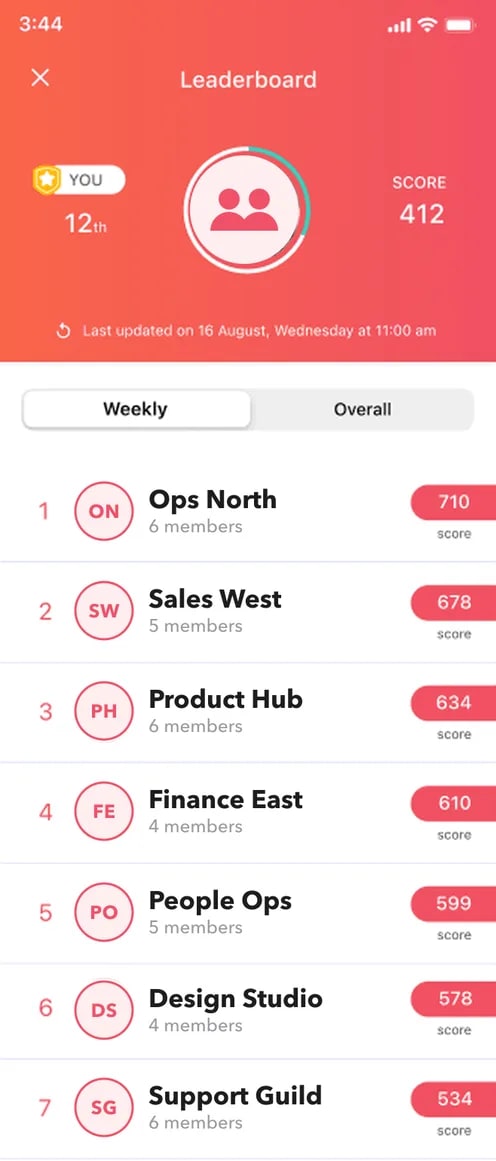
Illustrative UI · Average member scores are the default for team challenges; Journey challenges can use totals.
Each number comes from the named program or challenge series. Results vary by workforce and program design.
Trusted by 100+ organizations. Results reported in published Vantage Fit case studies.
Read the case studies →Review enrollment, activity tracking, challenge volume, data hosting, and pricing.
Review security and compliance →Bring a program goal. We’ll show how to build the challenge and review progress in Vantage Fit.


