An employee wellness portal is the platform an employer provides so employees can track health habits, join challenges and earn rewards, while HR runs the program and reports on it from one console. The features that matter most to a buyer are challenges people actually join, activity tracking that works without a wearable, rewards that feel fair, and reporting that shows participation without exposing anyone’s health data.
Most mid-size and large employers already run some form of wellness program, so the question is rarely whether to buy a portal. It is which one will still have employees logging in three months after launch. This guide covers the 11 features to look for, what each one does for HR, and the question to ask in every vendor demo.
Key Takeaways
- 83% of firms with 200 or more workers offer a program in smoking cessation, weight management or lifestyle coaching, according to the KFF 2025 Employer Health Benefits Survey.
- In the same survey, 53% of larger firms offer a health risk assessment and 43% offer biometric screening, so assessments are now a standard portal feature, not an extra.
- Participation is the number every other feature serves. Challenges, rewards and reminders exist to keep people logging in after launch week.
- Ask every vendor whether any admin screen or export shows one person's health data. The right answer is no: HR should see group totals only.
- Check which features sit on a higher plan. Reporting, leagues and lab-report tools are often gated, and that changes the real price.
11 Must-Have Features of an Employee Wellness Portal
Corporate wellness portals have changed a great deal in the past few years. Early versions were desktop websites that tracked physical activity. Today they run on phones and watches, and they cover sleep, nutrition, mindfulness and mental wellbeing alongside steps.
Here are the eleven features to check before choosing one:
- Feature #1: Health Tracking Tools
- Feature #2: Wellness Assessments
- Feature #3: Wellness Challenges
- Feature #4: Activity Tracking
- Feature #5: Gamification
- Feature #6: Rewards and Incentive Management
- Feature #7: Effective Reporting
- Feature #8: Social Feed and Customizable Communication
- Feature #9: Mobile App and Device Integration
- Feature #10: Personalized Experience
- Feature #11: Health Coaching and Educational Material
Feature #1: Health Tracking Tools

Health tracking lets employees record the numbers behind their own health, such as sleep, heart rate, weight, blood pressure and calorie intake, in the same place they track activity. Seeing those numbers move over weeks is what turns a one-off check into a habit.
For HR, the value is in the pattern, not the person. A good portal rolls these records up into group trends, so you can see whether sleep or activity is improving across a department without opening anyone’s individual record.
Check in the demo: Which metrics can employees log, and from which devices? Then ask the vendor to show you every admin screen and export. None of them should show one person’s weight, vitals or mood.
In Vantage Fit, employees log sleep, heart rate, weight and blood pressure in the same app that counts their steps. Each update counts toward participation, and the record itself stays private to the employee.
Feature #2: Wellness Assessments
Wellness assessments give employees, and the program, a starting point. They usually take the form of a health risk assessment (HRA), a short questionnaire about everyday habits, and sometimes a biometric screening that measures blood pressure, cholesterol or glucose.
Assessments are now common practice. The KFF 2025 survey found that 53% of firms with 200 or more workers offer an HRA and 43% offer biometric screening. The difference between portals is what happens to the results. If employees worry about who sees their answers, many will skip the assessment, and the baseline you were planning around never forms.
Educating employees about their health helps build a community of health-conscious people. It also supports a healthy work environment. For the design side, see our guide to running a wellness assessment.
Check in the demo: Is the assessment optional? Who sees the results? Can you use the results to plan programs without seeing individual answers?
Vantage Fit’s employee health risk assessment covers nine everyday health factors in the app, with no wearable or lab test. Each employee gets a private fitness score, and HR sees only aggregate counts.
Feature #3: Wellness Challenges

Challenges are where most participation comes from. They give employees a shared goal, a deadline and a reason to log in every day. That is why engaging wellness challenges are the feature buyers should test hardest.
Variety matters more than volume. A step challenge suits almost everyone, while hydration, sleep, squat and meditation challenges reach the people who will never top a step leaderboard. Rotating formats keeps a program from going stale after the first campaign.
Check in the demo: Can HR build and launch a challenge without the vendor’s help? How many formats are there? Can one challenge combine several activities, such as steps, water and sleep? Does it open and close on its own schedule?
Vantage Fit’s wellness challenges come in five formats HR can launch from the console: Race, Streak, Journey, E-Marathon and Custom, where one challenge can mix movement, meals, water, sleep and mindfulness.
Feature #4: Activity Tracking

Activity tracking records the physical activity employees do each day, from steps and workouts to sleep, nutrition and hydration. It is the data most other features run on, so its accuracy decides whether leaderboards and rewards feel fair.
Two things separate a good tracker from a weak one. First, it has to work for everyone, including employees with no fitness band. Second, it has to stop the same steps being counted twice when someone syncs a phone and a watch.
Check in the demo: Does tracking work from a phone alone? Which apps and wearables sync? Can employees log an activity no device picked up, such as a swim or a yoga class? What stops inflated or duplicated totals?
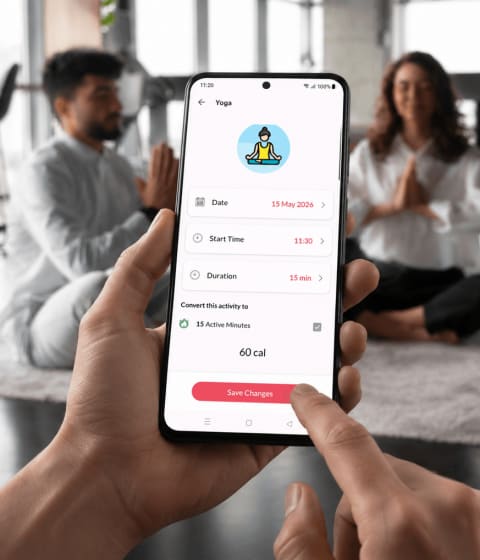
Vantage Fit’s activity tracking combines 65 kinds of activity into one daily total. It pulls from Apple Health, Google Fit, Fitbit, Garmin and Samsung Health, as well as manual logs, and flags a day whose data repeats the day before.
Feature #5: Gamification

Gamification gives participants a score for completing tasks and shows it on a leaderboard. Done well, it adds friendly competition. Done badly, it rewards the same handful of athletes every week while everyone else quietly stops logging in.
The fix is to reward consistency, not one big day, and to keep something live between challenges. Our guide to gamification for corporate wellness covers the design choices in more detail.
Check in the demo: What keeps people engaged between challenges? Does the ranking reward a steady week or a single burst? Can people compete as teams as well as individuals?
Vantage Fit ranks people on a leaderboard inside each challenge, and its Wellness Leagues place employees in Gold, Silver or Bronze tiers on a rolling daily step average that never resets between campaigns. Leagues come with an annual plan. To see both on your own workforce, request a demo.
Feature #6: Rewards and Incentive Management

Rewards give employees a tangible reason to keep going. A portal should let you attach wellness rewards to specific actions, such as walking 4,000 steps a day or finishing a challenge, and let you control what each action is worth.
For a multi-country workforce, fairness is the hard part. A flat gift card value means very different things in different cities, so the same effort ends up rewarded unequally. Rewards should also be tied to participation rather than health outcomes, which keeps the program inclusive of employees with medical conditions.
Check in the demo: Who sets the point values? Are rewards priced for each country, or one flat amount? Where do employees redeem them, and how do you report on redemption?
With Vantage Fit’s wellness rewards program, employees earn points for challenge tasks and milestones and redeem them for gift cards priced in local currency, across 190+ countries.
Feature #7: Effective Reporting

Reporting is how you answer leadership’s question: is the program working? An effective system tracks participation over time, shows who is active and who has gone quiet, and lets you segment the results by team or location.
A proper reporting system is the foundation of every later decision about the program. It also has to respect a firm line: reports describe the workforce, not individuals. An employee wellness dashboard that exposes one person’s health data creates legal risk and kills trust.
Check in the demo: Can you filter by date, country, department, age and gender, then export the result? Is any screen showing one person’s health data? Which reports need a higher plan?
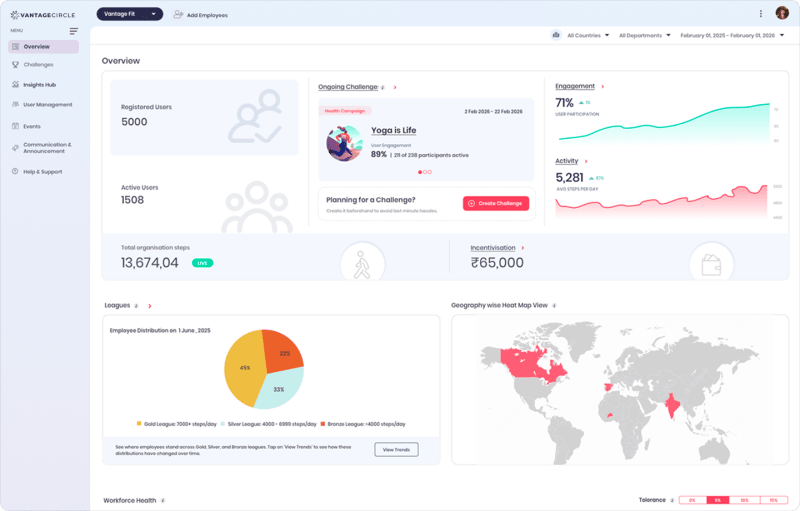
Vantage Fit’s workforce health insights put participation and activity figures in one console, with filters and CSV exports. No view shows one person’s health data. Wellness Score and Health Insights need an annual plan.
Feature #8: Social Feed and Customizable Communication

Social features let employees share accomplishments, cheer each other on and feel part of a group effort. A feed where colleagues can like and comment on a workout or a mindful minute builds a sense of community and social support.
Communication matters just as much. Most programs lose people quietly, in week two or three, when nobody reminds them. Automated messages for the welcome, the challenge start and a weekly summary do the work HR does not have time for.
Check in the demo: Which messages go out automatically? Can you brand them and send them in each employee’s language? Can you reach the people who have gone quiet without digging through reports?
Vantage Fit’s emails and app notifications cover each stage of a program, from 29 email templates and 34+ notification types in 13+ languages, and flag the employees who have stopped taking part.
Feature #9: Mobile App and Device Integrations

Wellness portals started as websites that could only be opened on a computer. Today employees expect to use them on a phone, with data flowing in from the watch they already wear.
Integration also has an IT side. Single sign-on spares employees a second password, and a roster sync from your HR system keeps joiners and leavers up to date without manual uploads. Together, those two decide how much admin work the portal creates.
"The Fit-o-meter challenge on their phones motivated them to participate."
— Pramod Patil, KEVA
Check in the demo: Which wearables sync? Is single sign-on supported, and which HR systems can feed the roster? Where will your data be hosted?
Vantage Fit integrates with Apple Watch, Fitbit, Garmin and Samsung, supports SAML 2.0 single sign-on and HR roster sync, runs inside Microsoft Teams, and hosts data in the US, Canada, the EU, the UAE or India.
Feature #10: Personalized Experience
Personalization means the portal adapts to each employee instead of giving everyone the same program. That can be a training plan built around someone’s schedule, content matched to their interests, or a challenge aimed at a group with a shared health goal.
The best personalization uses health information without exposing it. Targeting a challenge at employees with a particular risk profile should never reveal to HR who is in that group.
Check in the demo: Can employees set their own goals and pace? Can you target a challenge by team, location or health profile, and who can see the target list?
Vantage Fit offers personalized programs: multi-week fitness and habit plans each employee tunes to their own week. HR can also target challenges by country, department, age, gender or health-risk profile, and targeted challenges are private by default.
Feature #11: Health Coaching and Educational Material

Good health information is hard to find among everything published online. A wellness portal can solve that by offering a curated selection of educational material, such as articles, videos and audio, on nutrition, physical fitness, sleep and mental health.
Educational content works best when it is part of the program rather than a library nobody opens. Assigning an article or a short lesson as a challenge task, with a quick quiz, turns reading into participation you can measure.
Check in the demo: Is the content evidence-based and current? Can you assign it as a challenge task and see who finished it? Is live coaching included, or offered through a partner?
Vantage Fit’s content library of articles, videos and audio sits alongside its plans, and guided mindfulness audio plays offline, with finished sessions counting toward participation.
Wellness Portal Buyer’s Checklist
Use this table in your vendor demos. If you are running a formal selection, our list of RFP questions to ask wellness vendors goes further.
| Feature | Question to ask the vendor | What a good answer sounds like |
|---|---|---|
| Health tracking | Can any admin screen show one person's health data? | No. Records stay with the employee; HR sees group trends. |
| Wellness assessments | Is the assessment optional, and who sees the results? | Optional, private to the employee, aggregate counts for HR. |
| Wellness challenges | Can HR launch a challenge without your team? | Yes, from the console, in several formats. |
| Activity tracking | Does it work without a wearable? | Yes. Phone, synced apps and manual logs all count. |
| Gamification | What keeps people engaged between challenges? | An always-on ranking that rewards consistency. |
| Rewards | Are rewards priced for each country? | Yes, in local currency, tied to participation. |
| Reporting | Can I filter, then export? | Yes, with CSV exports and no individual health data. |
| Communication | Which reminders go out automatically? | Welcome, challenge start and weekly summary, in each employee's language. |
| Integrations | Do you support SSO and HR roster sync? | Yes, set up with your IT team. |
| Personalization | Can I target a group without seeing who is in it? | Yes. Targeted challenges stay private. |
| Education | Can content count as a challenge task? | Yes, with completion tracking. |
| Pricing | Which of these features need a higher plan? | A clear, written list. |
How Can Vantage Fit Wellness Portal Help You?

A wellness portal is not a wellness strategy on its own, but it is where the strategy either gets used or gets ignored. The deciding factor is participation: whether employees are still logging habits, joining challenges and earning rewards months after launch.
Vantage Fit covers the features above in one app and one admin console. Steps, workouts, meals, mindfulness and health data all feed the same participation rate, which HR follows from an employee wellness dashboard built on group totals. Vantage Fit is covered by Vantage Circle’s ISO 27001 and ISO 27701 certifications and SOC 2 Type II audit, and is GDPR and HIPAA compliant.
Most features come with a standard plan. Wellness Score, Wellness Leagues and Health Insights need an annual plan, and lab-report analysis is a premium add-on for selected clients. Vantage Fit is priced per challenge package, and the cost per employee falls as headcount rises. See Vantage Fit pricing for current plans.
Frequently Asked Questions
How much does an Employee Wellness Portal cost?
It depends on headcount, the features you need and the pricing model. Some vendors charge per employee per month, others per program or challenge package. Ask which features sit on a higher plan, because reporting and health-data tools are often gated. Vantage Fit is priced per challenge package, and the cost per employee falls as headcount rises; see Vantage Fit pricing.
Can an Employee Wellness Portal be integrated with other HR systems?
Usually, yes. Look for single sign-on through SAML 2.0, so employees use their work login, and a roster sync from your HR system, so joiners and leavers update on their own. Both are normally set up with the vendor's technical team rather than switched on in a day.
What is the difference between a wellness portal and a wellness app?
A consumer wellness app serves one person. A wellness portal is run by the employer: it adds company challenges, rewards, communication and an admin console for reporting on participation. Many portals are delivered through a mobile app. Our roundup of employee wellness apps compares the options.
What can employers see in a wellness portal?
In a well-designed portal, employers see group totals: how many people are taking part, trends by team or location, and challenge and reward activity. They should not see any individual's weight, vitals, mood or assessment answers. Ask the vendor to show you every admin screen and export to confirm it.
What are the common metrics to track in the wellness portal?
Start with participation rate, the share of employees who are active, inactive or dormant, challenge completion and reward redemption. Add trends in activity, sleep or other habits at group level. Pair those numbers with an employee survey so you know why they moved.
Can I use the wellness portal for remote employees?
Yes. Because modern portals run on a phone, remote and field employees can join the same challenges as office staff. Check that tracking works without a wearable, that messages go out in each employee's language, and that the vendor can host data in the region you need.