The Admin Dashboard is your command center for managing your company’s wellness program. From here, you can create challenges, monitor employee engagement, view reports, send communications, manage content, and configure app settings.
Accessing the Dashboard
The Admin Dashboard is a web application — access it from your browser at your company’s VantageCircle admin portal. You need HR Admin access (your Vantage Fit account manager can set this up).
Dashboard Home (Overview)
When you sign in, you’ll see the Overview page with real-time metrics:
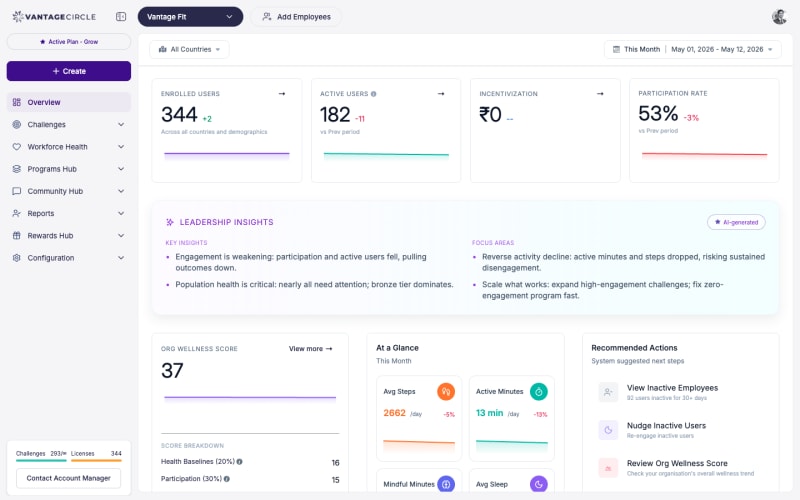
KPI Cards
- Active Users — employees who’ve used the app recently (engagement metric — this is different from billing’s “active users”, which counts every employee who has signed in at least once; see How Do I Add Employees? for the billing definition)
- Enrollment Rate — percentage of employees who’ve signed in
- Completion Rate — challenge completion metrics
- Org Wellness Score — your organization’s composite wellness metric (if enabled)
AI-Powered Insights
The Leadership Insights section highlights key findings — top performers, dormant users, engagement trends — and suggests recommended actions.
Filters
All dashboard data can be filtered by:
- Date range — presets (7 days, 30 days, quarter, year) or custom
- Country / Location
- Department
- Age group
- Gender
What You Can Do
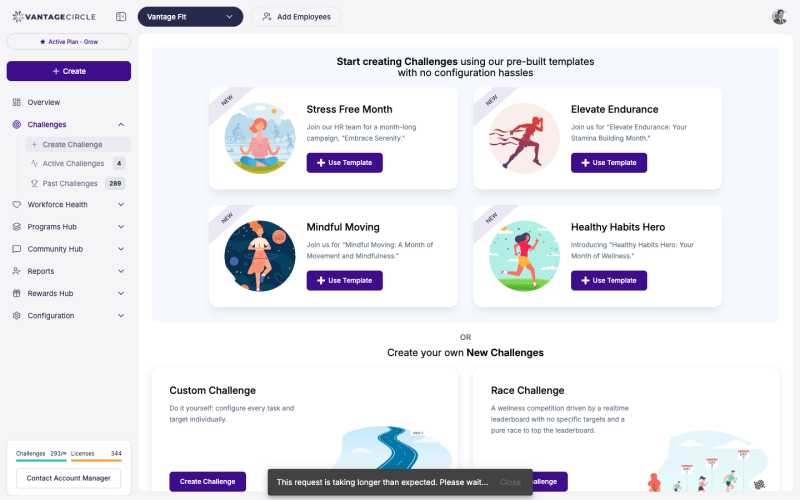
Create & Manage Challenges
- Create 5 challenge formats directly: Custom, Race, Journey, Streak, E-Marathon
- Use pre-built templates for quick setup
- Manage active challenges: add/remove participants, create teams, view leaderboards
- Reschedule, force start, or stop challenges
Employee Management
- Add employees via CSV upload
- View enrollment and activity status
- Search and filter employees
- Export employee reports
Reports & Analytics
| Report | What It Shows |
|---|---|
| Employee Report | Enrollment status, active/inactive/dormant |
| Transaction Report | Points earned and redeemed |
| Redemption Report | Gift card redemptions |
| Leaderboard | Challenge rankings (exportable CSV) |
| League Reports | League standings and trends (if enabled) |
| Wellness Score Report | Employee-level wellness scores (if enabled) |
Communication
- Send Push Notifications — target specific audiences, preview before sending
- Send Custom Emails — branded company emails to employees
- Create Announcements — post to the social feed
Content Library
- Create and manage articles, videos, and podcasts
- Attach quizzes to content
- Publish/unpublish content items
Events
- Create wellness events with date, time, venue
- Target events to specific departments, countries, or demographics
- Track RSVPs
- Send invitations and reminders
Rewards
- Upload Points — bulk upload via CSV with OTP verification
- View Redemption Reports — see who redeemed what
- Configure Wellness Badges — set up badge criteria
App Configuration
- Settings — toggle features (wellness score, leagues), upload custom app logo, configure email banner
- Preview Emails — view and preview all system email templates
- Add Employees — bulk user import
Custom Activities
- Create loggable activities — employer-branded activities with icon + name (e.g., “Office Yoga”)
- Create adherence activities — habit tracking activities (e.g., “Avoid Sugar”) that appear in employees’ Plus menu
What’s Not Self-Serve
Some settings require Vantage Fit support (contact your account manager):
| Setting | What It Does |
|---|---|
| Enable/disable SSO | Configure single sign-on |
| Enable Lite Mode | Switch to steps-only experience |
| Enable wellness leagues | Turn on Gold/Silver/Bronze leagues |
| Enable wellness score | Turn on org wellness scoring |
| Custom challenge scoring logic | Override default scoring formulas |
| Custom Journey templates | Branded milestone designs |
| Toggle individual email types | Enable/disable specific system emails |
Need more help? Contact your Vantage Fit account manager or email support@vantagecircle.com.
Related articles: