Notifications in wellness apps are timed prompts that nudge employees toward healthy actions like logging steps, joining challenges, or pausing for mindfulness. They drive consistent engagement only when they are relevant, well-timed, and respectful of context.
When used with precision, notifications become the quiet driver behind consistent app usage. They bring the right action to the surface at the right moment and also turn passive users into active participants. Otherwise, they become just another alert that gets dismissed without a second thought.
So what separates a nudge that gets acted on from one that gets swiped away? Let’s dig into the psychology behind it, the notification types that drive engagement, why so many fail, and how Vantage Fit puts these ideas into practice.
Key Takeaways
- Notifications drive wellness app use only when they are relevant, well timed and respectful of employees’ time.
- Behavior happens when motivation, ability and a prompt meet, so a nudge works by triggering motivation that already exists.
- Different moments call for different nudges: reminders, progress updates, achievements, event alerts, insights and social proof.
- Overload backfires, with many users switching notifications off once messages arrive several times a week.
- Timing and context matter, because a nudge that interrupts focused work or personal time breeds resentment.
- HR teams get the best results from a few targeted, actionable messages a week, sent during working hours.
The Psychology of the Nudge
Before we talk about strategy, it helps to understand what actually makes a notification work.
At the center of this is the psychology of the “nudge”. A nudge is basically a small push that helps people make a better choice without forcing them to do it. In the world of apps, this nudge usually takes the form of a notification.
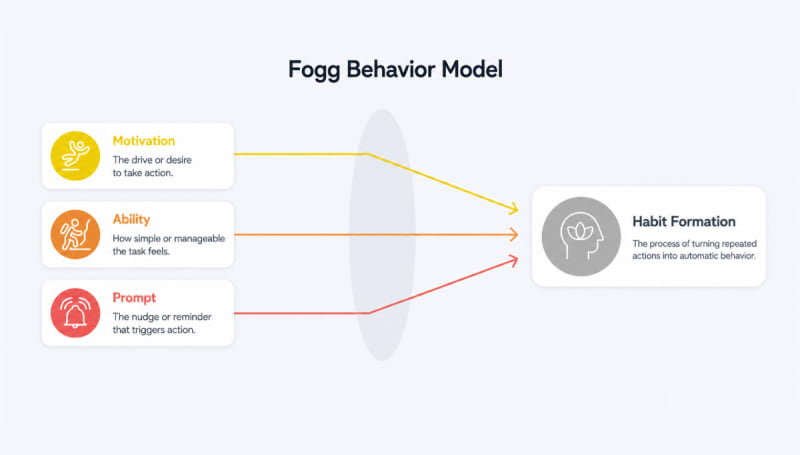
The most famous way to explain this is the Fogg Behavior Model, developed by Stanford researcher B.J. Fogg. It says that for any action to happen, three things must click into place at the same moment: Motivation, Ability, and a Prompt.
- Motivation is how much you actually want to do the task.
- Ability is how easy or hard the task feels.
- The Prompt is the “nudge” or reminder that says, “Do this now”.
If any of these three are missing, the behavior isn’t likely to happen. You might really want to meditate (Motivation), and it might be easy to do (Ability), but if you get busy and forget, you need a prompt (Notification) to spark the action.
It is important to stress that notifications do not motivate in and of themselves. They wake up the motivation that already exists and bring it to the surface at the right moment.
For instance, if an employee has zero interest in a wellness program, a notification is just a distracting “ping” that gets ignored. But for someone already interested, a well-timed nudge is a helpful tool that helps them cross the “activation threshold” and actually get moving.
A well-timed nudge turns a passing thought into a small action. Over time, those small actions begin to form lasting habits.
Three Types of Strategic Nudges
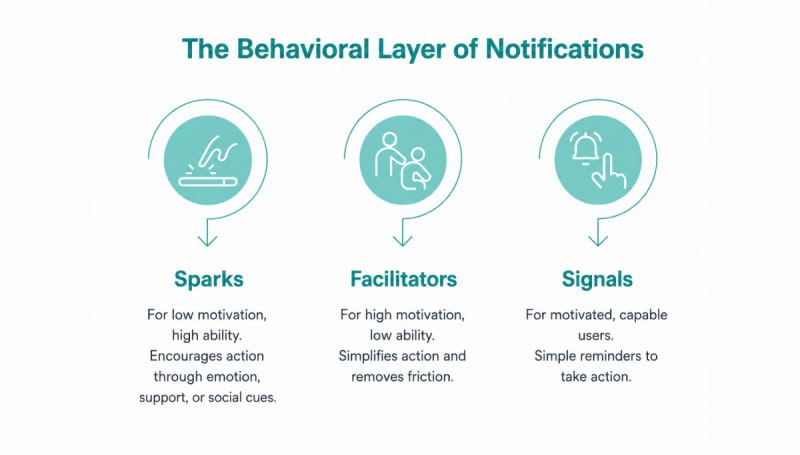
To make this more actionable, notifications can be designed in three distinct ways:
- Sparks: Used when motivation is low, but ability is high. These notifications inspire action using emotion, encouragement, or social motivation.
- Facilitators: Used when motivation is high, but the task feels difficult. These simplify the action, often through deep links that remove friction.
- Signals: Simple reminders for users who are already motivated and capable. Over-explaining here can feel annoying.
This distinction matters. Sending the wrong type of nudge at the wrong time is one of the biggest reasons notifications fail.
Now that we understand how nudges work, the next step is understanding what they look like in practice.
Types of High-Impact Notifications
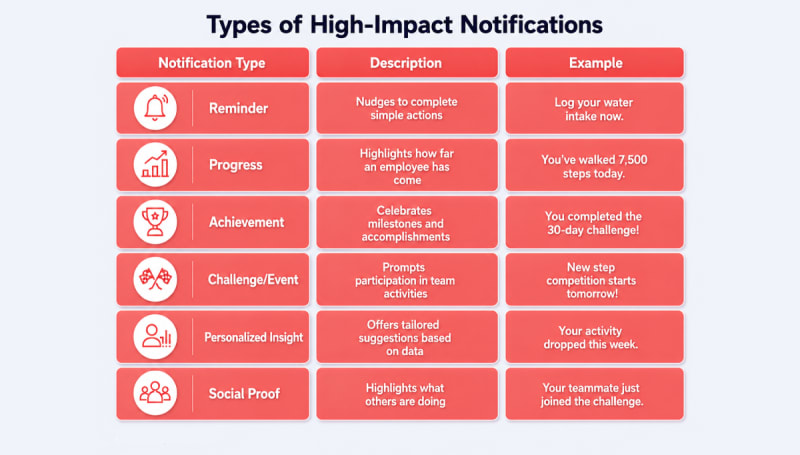
Not all notifications drive engagement. The ones that work are clear, relevant, and timed to match the user’s behavior. In wellness apps, certain types of notifications consistently lead to higher interaction because they connect directly with an employee’s goals and daily routine.
1. Reminder Notifications
These are the most common nudges in wellness apps. They remind employees to complete simple actions such as logging steps, tracking water intake, or finishing a mindfulness session. Their purpose is to bring attention back to the app at the right moment.
2. Progress Notifications
These notifications highlight how far an employee has come. For example, a message might say, “You’ve walked 7,500 steps today. Only 2,500 to go.” This type of feedback reinforces positive behavior and encourages users to finish what they started.
Progress messages seem to suit regular users best. In one study of a self-monitoring app, notifications containing insights into progress were linked with more self-monitoring among frequent users, which helps keep them engaged with wellness activities.
3. Achievement Notifications
Recognition is a powerful motivator. Achievement notifications celebrate milestones such as completing a challenge, maintaining a streak, or reaching a step goal. These alerts create a sense of accomplishment (a core principle behind gamification in corporate wellness) and encourage employees to repeat the behavior that earned the recognition.
4. Challenge and Event Notifications
Wellness platforms often run team challenges, step competitions, or short health campaigns. Notifications announcing these events prompt employees to participate before they miss the opportunity.
Because they create a sense of urgency and social participation, they can significantly increase app visits and activity.
5. Personalized Insight Notifications
These messages use employee data to offer tailored suggestions. For example, a notification might say, “Your activity dropped this week. A short walk today can help you stay on track.”
Tailoring pays off. In a trial of 1,255 workplace wellness app users, people were 3.9% more likely to open the app within 24 hours after a tailored health message than when none was sent.
6. Social Proof Notifications
These notifications highlight what others are doing. For example, “Your teammate just joined the challenge” or “3 colleagues cheered your milestone.” They create a culture of wellness and a sense of peer motivation. When employees see others participating, they are more likely to join in themselves.
When used thoughtfully, each of these notification types plays a different role. Some remind employees to act. Others reinforce progress or create excitement around new activities. Together, they help wellness apps stay present in an employee’s day without becoming intrusive.
Strategic Notification Tactics to Increase Employee Usage in Wellness Apps
Understanding notification types is useful. Strategically designing them is what drives real engagement. That is where behavioral science, timing, and product design come together.
| Strategy | How it works | Impact on usage |
|---|---|---|
| The Hooked Model | Based on Nir Eyal’s model of trigger, action, variable reward and investment. A rewarding, slightly unpredictable response follows the action, such as a surprise badge or a cheer from a teammate. | Builds habit loops and improves long-term retention. |
| Loss Aversion | Highlights what users might lose. For example, “You’re 2 days away from losing your streak.” | Creates urgency and drives immediate action. |
| Contextual Timing | Sends notifications when users are most likely to act, such as during breaks or low-activity periods. | Improves response rates by matching real-life moments. |
| Low-Friction Action | Allows users to act directly from the notification, like logging water or steps instantly. | Reduces effort and increases quick interactions. |
| Personalization at Scale | Uses behavior data to tailor messages. For example, dips in activity or missed goals. | Makes notifications feel relevant, which improves engagement. |
| Re-engagement Nudges | Targets inactive users with gentle prompts like “We miss you. Let’s get back on track.” | Brings back dormant users and reduces drop-offs. |
| Frequency Control | Limits notifications and lets users choose how often they receive them. | Prevents fatigue and reduces opt-outs or app uninstalls. |
| Action-Oriented Copy | Keeps messages short, clear, and focused on one action. For example, “Take a 5-minute walk now.” | Makes it easy to act quickly without thinking twice. |
Research on internet interventions shows that tailored messages effectively persuade and motivate users (Neff & Fry, 2009; Webb et al., 2010). Users engage more attentively with content they perceive as personally relevant, making personalization a strong driver of information processing (Kreuter et al., 1999).
Researchers describe this approach as content tailoring, which is also why personalization ranks among the must-have features in any health and wellness app.
Source: sciencedirect.com
Why do Wellness App Notifications Fail?
While digital nudges are a powerful way to build healthy habits, they can backfire if used without restraint. To protect the ROI of a wellness program, organizations must ensure that their communication strategy does not cross the line from a helpful support system into a source of digital exhaustion.
When employees feel bombarded, the resulting distrust leads them to mute alerts or, in many cases, uninstall the app entirely, effectively ending the program’s ability to drive health outcomes.
The following three risks highlight why a “less is more” approach is often superior:
- The law of diminishing returns: Past a certain point, more notifications can mean less participation. When the “noise” of constant pings outweighs the value of the content, users develop a defensive habit of ignoring the alerts.
In one survey of US smartphone users, 64% said they would stop using an app altogether if it sent more than five push notifications a week.
That kind of disengagement undercuts a program’s ROI, because it cannot improve productivity or reduce absenteeism if the workforce has tuned it out.
The flip side is just as telling. Ashish Kumar Jha has seen it at Vani, his communication-coaching platform: adoption in the first two or three weeks is often below 30–35%, but once people get early wins, it reaches 90–93% by week 15 or 16.
As he put it on the Vantage Fit podcast:
"Once people have had their breakthroughs and they have confidence in the process, nobody needs to tell them to go and practice."
— Ashish Kumar Jha, Co-founder & CEO, Vani | Vantage Fit Corporate Wellness Podcast
The goal of every notification, then, is not just to prompt an action today; it is to make the next prompt unnecessary.
- Work-life balance issues: Because employees often perceive wellness participation as an organizational task assigned by management, they are highly sensitive to when these “tasks” interrupt their lives.
Sending notifications outside work hours or during personal time can be seen as an intrusion, making employees feel they are perpetually “on the clock”. Disrespecting these boundaries fosters resentment and makes the wellness app seem like a burden rather than a benefit.
- Irrelevance (context failure): A nudge only works if it hits the “Kairos” i.e., the perfect, opportune moment when an employee is both motivated and able to take action. Most apps fail by relying on fixed, time-based triggers that ignore what employees are actually doing.
A notification that interrupts a user during deep-focus work or while they are otherwise occupied quickly becomes a distracting nuisance. Repeated context failures signal to the employee that the app does not understand their needs, leading to a quick dismissal of all future communications.
Notifications are powerful, but only when used with care. Fewer, better-timed, and more relevant nudges will always outperform a constant stream of alerts.
How Vantage Fit puts these principles into practice
The theory above is easy to agree with and harder to ship. Three things Vantage Fit does differently:
- Important updates reach employees across multiple touchpoints. A badge unlock, points credit or challenge update can arrive as a mobile push notification, in the in-app notification bell or by email, so employees stay informed wherever they check in.
- Meaningful actions trigger the notifications. Alongside reminders employees set for themselves, Vantage Fit responds to what they actually do. Completing a task, syncing steps, enrolling in a challenge, earning points or a broken device connection can all prompt a timely nudge. This makes notifications feel useful instead of disruptive.
- Messages speak the employee’s language. System emails arrive in each employee’s preferred language, with 19 languages supported, and admins can target pushes by department, location or demographics so the right people get the right message.
Best Practices for HR & App Admins
If you are implementing or managing a wellness platform, these are the “golden rules” for notification management:
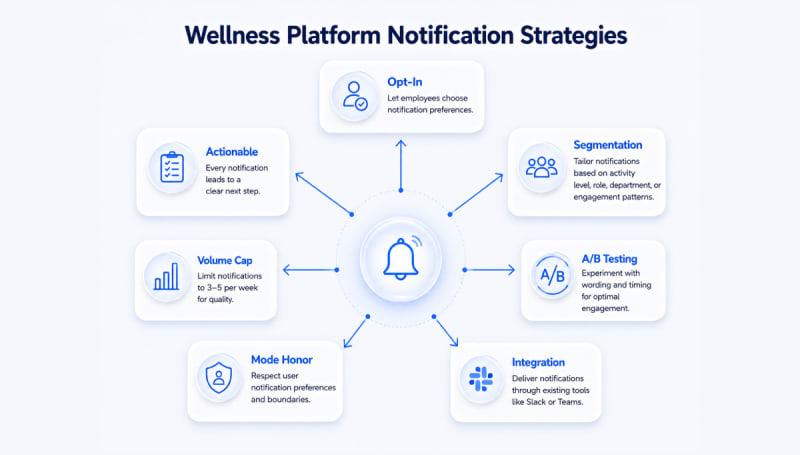
- Opt-in is essential. Let employees choose what they want to hear about. For example, “Only notify me about team yoga challenges” or “Skip the daily step reminders.” People stay engaged when they feel in control. In Vantage Fit, HR sets these preferences at company level for now.
- Segmentation keeps it relevant. Never send the same ping to everyone. Group people by activity level, department, role, or even time zone. New users need different prompts than active participants. Lapsed users need re-engagement through reminders.
- A/B test everything. Constantly experiment with different wording and timing. Sometimes “Take three deep breaths now” outperforms “Time for mindfulness.” Other times, a question works better than a command. Let the data pick winners.
- Meet employees where they work. The best notifications appear in the tools employees already use, so messages feel like part of the workday instead of an extra app to check.
- Default to work hours only. Set quiet periods automatically. No non-urgent wellness pings after 7 PM, on weekends, or during local holidays. Respecting boundaries builds trust faster than any clever copy.
- Cap the total volume. One or two well-chosen pushes per employee per week is a sensible default. Quality always beats quantity. Track opt-out rates as your early warning system.
- Make every notification actionable. Every ping should lead to one clear next step. Use deep links that take people straight to the mood logger, challenge join screen, or progress tracker. Friction kills response rates.
Ease of use matters as much as clever copy, as Mindsprint found:
"VantageFit not only provided a smooth user experience but also helped us foster a spirit of wellness and camaraderie within the organization."
— Mindsprint
Final Thoughts
Consistent engagement is what gives wellness programs their real impact. Moreover, that consistency often begins with something as small as a well-timed notification.
Rather than acting as simple reminders, effective notifications guide behavior in subtle ways. They bring attention back to goals, highlight progress, and make the next step feel clear and easy. Over time, these small moments of action start to build a steady rhythm of participation.
In practice, Vantage Fit brings this balance to life by tying notifications to what employees actually do and to the rhythm of their workday. The result is an experience that feels natural and easy to stay engaged with.
Ultimately, constant nudging cannot drive strong engagement, but thoughtful interactions that fit effortlessly into the flow of everyday work and grow into lasting habits can.
Frequently Asked Questions
How often should a wellness app send notifications?
One or two well-chosen pushes a week is a good default, and Vantage Fit’s own admin guidance recommends it. In one survey, 43% of users said 2–5 a week would make them switch notifications off.
Do push notifications increase wellness app engagement?
They can, though the effect is modest. A systematic review found that technology-based prompts can promote engagement with digital health tools compared with no prompts, though the evidence was mixed.
When is the best time to send wellness notifications?
When people can act on them. In a workplace app trial, tailored messages had their biggest effect at 12:30 pm on weekends, though the weekday and weekend difference was not statistically significant.
Do wellness nudges lose their effect over time?
They can. In the HeartSteps study, walking suggestions first raised step counts by 66% over the next 30 minutes, but the effect diminished as the weeks went on.
How do you personalize wellness app notifications?
Base them on what each person does and cares about, such as their goals, recent activity and the challenges they have joined. Segmenting by team, location or activity level also keeps messages relevant.