If your employer has enabled self-registration, you can create your Vantage Fit account directly from the app using your work email. The process takes about two minutes.
Before You Start
Self-registration is available by default for all companies on Vantage Fit. If your company’s email domain is set up in the system, you can register yourself.
Note: Some email domains are restricted from self-registration (for example, companies that manage employee onboarding through other channels). If your domain is blocked, contact your HR admin to have your account created manually.
How to Register
-
Open Vantage Fit and enter your work email — the same way you would if signing in.
-
Tap “Register Now” when the app detects that your email is not registered.
Note: If your company uses SSO, registration happens automatically when you sign in through your company’s login system for the first time — no separate registration step needed.
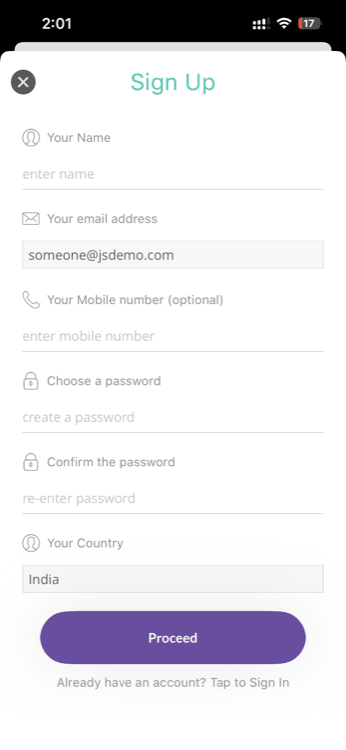
- Complete the registration form — select your geography, enter your name, and set a password.
-
Verify your email with OTP — enter the 4-digit code sent to your work email within 5 minutes.
Tip: Check your spam or junk folder if the code doesn’t arrive within a minute.
-
Account created — you’re automatically signed in and taken to onboarding (or directly to summary page, depending on your company’s configuration).
Registration Details
| Detail | Value |
|---|---|
| Email verification | 4-digit OTP, valid for 5 minutes |
| Password | Required during registration |
| Auto sign-in | Yes, after registration completes |
| Health data collected | None during registration — that comes during onboarding |
What Happens Next
After registration, you’ll typically see:
- Terms & Conditions — tap “Agree” to continue
- Onboarding health profile (if your company uses Full Mode) — this is where you enter your height, weight, fitness goal, and other health details. This step is optional and can be skipped.
- Summary Page — once you’re through, you land on summary page and can start tracking
No health data is collected during the registration process itself. Your height, weight, and other health metrics are only requested during the optional onboarding step.
If Your Email Domain is Blocked
Some companies restrict self-registration to prevent unauthorized sign-ups. If you see an error when trying to register with your work email:
- Contact your HR admin — ask them to add your account through the admin dashboard
- Check with IT — your company may use SSO instead of self-registration
Your employer has chosen to manage account creation through a different process.
Need more help? If you’re having trouble registering, contact your HR admin to confirm that self-registration is enabled for your company.
Related articles: